A computer’s native tongue is binary, the famous ones and zeros worshiped by early mainframe programmers. Clumped into bytes and words, these digits easily represent an armada of integers, both positive and negative values. But what about fractions, decimal values, huge numbers, and teeny tiny numbers? What’s the secret to their storage?
Many years ago, teams of computer scientists in white lab coats came up with the IEEE 754 Standard for floating point arithmetic on computer systems. This standard forms the basis of how real numbers are presented in and used by programming languages.
In C, the float data type is defined as a single precision floating-point value. Also referred to as binary32, it consists of 32 bits of information which represent values in the range of 3.4 × 1038 through 1.2 × 10-38, positive and negative. This range is incredibly range, which is where the precision part comes into play.
The single precision of a float implies that the value represented is accurate up to about seven digits. Officially, the precision is defined as anywhere between six to nine significant decimal digits. For almost all mathematical operations, such precision is adequate; the double data type offers twice as much precision when required.
I’m curious how such information is stored inside 32 bits. Obviously, something sneaky must be going on.
Figure 1 illustrates how 32 bits of binary data is divided when representing a real number.
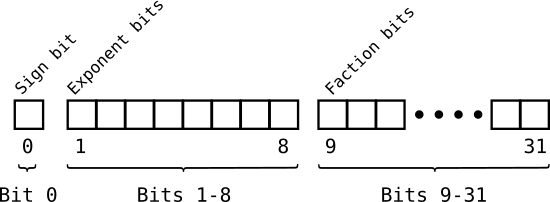
Figure 1. The deets on how a real number is stored in binary.
The bits are organized into three clumps:
- A sign bit, positive or negative
- Eight exponent bits, which set the value’s magnitude (size)
- Twenty-three fraction bits, the value itself also called the mantissa or significand
To witness this storage, I’m exploiting the weakness of a C language union by setting a float value but then examining it as a long int. This approach lets me peek at the bytes inside the single-precision value and output the result to reflect what you see in Figure 1. Here’s the code:
2026_10_24-Lesson.c
#include <stdio.h>

int main()
{
    union real {
        float a;
        long b;
    };
    union real numb;
    int x;

    /* gather input */
    printf("Enter a value: ");
    scanf("%f",&numb.a);

    /* output real number value */
    printf("The value %f is stored as: ",numb.a);

    /* read bytes */
    for( x=0; x<32; x++ )
    {
        if( x==1 || x==9 )
        {
            putchar(' ');
        }
        putchar( numb.b & 0x80000000 ? '1' : '0' );
        numb.b <<= 1;
    }
    putchar('\n');

    return 0;
}
The program prompts for a real number. The value is then displayed, along with each of the bits as stored in the binary32 format. The union real allows me to access the float inside numb.a as long int numb.b. A for loop plows through each of the 32 bits, outputting a one or zero in the proper place, along with a space between the sign bit and exponent bits as well as the exponent bits and the fraction bits.
Here’s a sample run:
Enter a value: 12.375
The value 12.375000 is stored as: 0 10000010 10001100000000000000000
This output accurately shows how the value 12.375 is represented as a real number in the binary32 format, a float. Of course, what you see are just bits and they don’t exactly explain much. For next week’s Lesson, I split this value into its integer components, which is the next step toward understanding what each clump represents.