I’ve written about binary fractions before, though to study how they’re stored in a real number requires more depth (see last week’s Lesson). Essentially, binary fractions are just negative powers of two.
Figure 1 is from my original binary fraction post about ten years ago. It’s also one of the first hits you see on Google when searching for binary fractions, which amuses me.
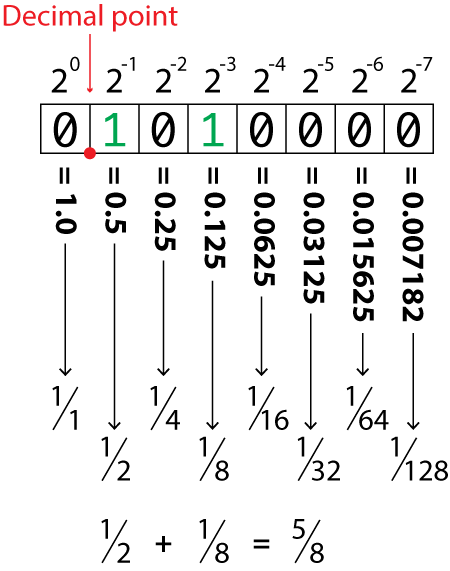
Figure 1. Negative powers of 2 used to represent fractions in a binary number.
First, some ugly math: 2-1 is the same as ½ or 0.5. If you take 2-2 it’s the same as 1/2×2 or ¼ or 0.25. The same pattern holds true for values cascading along the fractional binary path, as illustrated in Figure 1.
Second, to create a binary values for decimals other than powers of two, you must combine fractional binary values. This method mirrors how integers are created with binary, though for fractions it’s more difficult to be precise.
For example, the integer value 102 is written as 01100110 in binary. That is 0×128 + 1×64 + 1×32 + 0×16 + 0×8 + 1×4 + 1×2 + 0×1, or 64 + 32 + 4 + 2, which equals 102.
Now take the value 0.375. In binary this value is written as 0.011. That is 0×1.0 (the first digit), decimal, 0×0.5 + 1×0.25 + 1×0.125, or 0.25 + 0.125, which equals 0.375.
To translate a decimal fraction into a binary fraction you must peel off each negative power of two (2-n) until you get the proper value — or at least close enough to it. This “close enough” is the precision, which is a part of every real number stored in a computer.
The following code prompts for a fraction, any value between zero and positive one. The value input, a real number, is manipulated to obtain the binary digits for negative powers of two, with the result output as a string.
2026_11_14-Lesson.c
#include <stdio.h>
#include <stdlib.h>

int main()
{
    int x;
    float f;

    /* gather input */
    printf("Enter a positive decimal: ");
    scanf("%f",&f);
    if( f>=1.0)
    {
        puts("Enter a value 0.0 to 1.0");
        return(-1);
    }

    /* process fraction */
    printf("0.");
    for( x=0; x<16; x++ )
    {
        f *= 2.0;
        if( f==0 )
            break;
        if( f>=1.0 )
        {
            putchar('1');
            f -= 1.0;
        }
        else
            putchar('0');
    }
    putchar('\n');

    /* clean-up */
    return 0;
}
After confirming input, the fraction is processed for 16 negative powers of two:
for( x=0; x<16; x++ )
For each iteration, the value of variable f (the fraction input) is doubled:
f *= 2.0;
The effect is to undo the negative power of two by raising the value by a power by two. So 2-1 becomes 20, or one. When the value of f at this point is zero, no more fractional portion of the value is available for processing, so the loop ends:
if( f==0 )

    break;
Otherwise, when the value f is greater than zero, a binary digit has been found. The a ‘1’ is output and the value of f is reduced by 1.0:
if( f>=1.0 )

{

    putchar('1');

    f -= 1.0;

}
When the value of f is not greater than 1.0, and it’s not yet zero, no binary digit was found. A ‘0’ is output:
else

    putchar('0');
The process continues until all 16 powers of negative two have been processed, or the value of variable f is equal to zero.
Here is a sample run for the value 0.375:
Enter a positive decimal: 0.375
0.011
The result output is described earlier in this post: 0.25 + 0.125.
Here are a few more runs:
Enter a positive decimal: 0.5
0.1
The value 0.5 is 0.1 binary, 2-1.
Enter a positive decimal: 0.1
0.0001100110011001
The value 0.1 is one of those decimals that can’t be represented precisely, though the result is close. In this case, it would be interesting to see how 0.1 is presented in the binary32 format originally found in the floating point value f. I explore how this comparison can happen in next week’s Lesson and how my approach here may not be perfect.