Binary fractions are nutty, yet they’re an important part of understanding how real numbers are stored in a computer. Continuing from last week’s Lesson, here I compare my results of fraction translation with values stored in the binary32 format used by the computer. Doing so requires some manipulation — and some assistance from our old pal, the C language union.
The problem with comparing my binary fraction interpretation with what’s present in a real number’s bit pattern is that the bits in the binary32 format are shifted based on an exponent value. Further, the leading ‘1’ is removed from the resulting number. (The leading 1 bit is “assumed” in this format.)
For example, here’s output for the fraction 0.375 from the code presented in last week’s Lesson:
Enter a positive decimal: 0.375
0.011
The value 0.375 is stored in the binary 32 format as this bit pattern:
00111110110000000000000000000000
Figure 1 shows how these bits sort out.
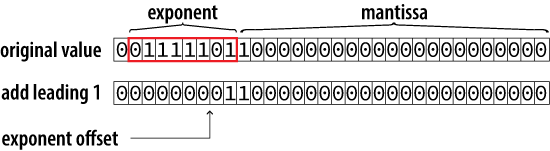
Figure 1. How the fraction is extracted from the binary32 format.
In the figure, you see the sign bit is 0, positive. The exponent is 0x7D. The mantissa is 0x400000. To compare the result from my code in last week’s Lesson with the fraction as stored in the binary32 requires some manipulation. This job is handled in the following update to the code from last week’s Lesson:
2026_11_21-Lesson.c
#include <stdio.h>
#include <stdlib.h>

/* output binary representation of the fraction */
void binout(unsigned b)
{
    int x,exponent;

    /* extract exponent */
    exponent = b & 0x7F800000;
    exponent >>= 23;
    /* undo the standard bias of 127 */
    exponent -= 127;
    /* mask out the sign and exponent */
    b &= 0x00EFFFFF;
    /* add the "assumed" leading bit */
    b |= 0x00800000;

    /* output binary decimal */
    printf("binary32: 0.");
    for( x=0; x<32; x++ )
    {
        /* account for exponent shift, max 9 places */
        if( x>=9+exponent )
            putchar( b & 0x80000000 ? '1' : '0' );
        b <<= 1;
    }
    putchar('\n');
}

int main()
{
    union real {
        float f;
        long l;
    } numb;
    int x;

    /* gather input */
    printf("Enter a positive decimal: ");
    scanf("%f",&numb.f);
    if( numb.f>=1.0 )
    {
        puts("Enter a value between 0.0 to 1.0");
        return(-1);
    }

    /* output original binary value */
    binout(numb.l);

    /* process fraction */
    printf(" extract: 0.");
    for( x=0; x<32; x++ )
    {
        numb.f *= 2.0;
        if( numb.f==0 )
            break;
        if( numb.f>=1.0 )
        {
            putchar('1');
            numb.f -= 1.0;
        }
        else
            putchar('0');
    }
    putchar('\n');

    /* clean-up */
    return 0;
}
The binout() function outputs a string representing the binary values stored in the fractional part of a binary32 formatted real number. It accomplishes this task in several steps.
First, the exponent value is extracted:
exponent = b & 0x7F800000;

exponent >>= 23;
The bitwise & operator masks out the exponent value, which is then shifted 23 places right. This process is described in a previous Lesson. Because the value is based on the standard bias of 127 (per the binary32 format), it must be adjusted to obtain the true exponent value:
exponent -= 127;
The result determines how the binary fraction is shifted, left or right based on the exponent’s sign.
Next, the binary fraction is pulled from the rest of the number:
b &= 0x00EFFFFF;
The bitwise & masks out the binary fraction. But the leading 1 bit is assumed, so I add it back in with a bitwise | (OR) operator:
b |= 0x00800000;
The remainder of the code outputs the binary fraction, but only given the offset provided by the exponent value in variable exponent. This value shifts the number’s starting position when the result is output inside the for loop.
The goal of all these steps is to compare the binary fraction as it’s stored in the binary32 format against what my code generated from last week’s Lesson. Here’s a sample run:
Enter a positive decimal: 0.375
binary32: 0.0110000000000000000000000
 extract: 0.011
The values match. Here are a few more examples that match:
Enter a positive decimal: 0.625
binary32: 0.101000000000000000000000
 extract: 0.101

Enter a positive decimal: 0.1
binary32: 0.000110011001100110011001101
 extract: 0.000110011001100110011001101
But not all fractions match:
Enter a positive decimal: .999
binary32: 0.111011111011111001110111
 extract: 0.111111111011111001110111

Enter a positive decimal: 0.825
binary32: 0.110000110011001100110011
 extract: 0.110100110011001100110011
For the fractions 0.999 and 0.825, you see an extra bit in my output verses what’s output from the binary32 format. I explain the funkiness behind this discrepancy in next week’s Lesson.
Because I wanted to expand the program I had written for your Splitting Up a Real Number blog post myself, I did not use the above code. Instead I extended my original code by adding a function
significand_string()which writes the 23 bits of the significand (for 0. ≤ float_val < 1.) into a string variable that can then be output.Interestingly, my program does not exhibit the discrepancies described above.
Hope I donʼt spoil anything, but I think the bitmask
0x00EFFFFF(or 0b111011111111111111111111 in binary), as used in thebinout()function and intended to isolate the bits of the significand, seems to be wrong.With struct binary32 { uint32_t significand : 23; uint32_t biased_exponent : 8; uint32_t sign : 1; } the bitmask should instead be
0x007FFFFF(or 0b11111111111111111111111 in binary).As such, the following single line change seems to do the trick:
/* mask out the sign and exponent */
b &= 0x007FFFFF;
With that, the output for both binary32: and extract: appears to be identical for all of the test values given above.
You are correct! That is a typo on my part. Thanks for the catch!
I am glad my remark was helpful ☺
For the sake of completeness, here is my implementation of the mentioned
significand_string()function. To keep the code simple, the following code also comes with the limitation that the provided values must be ≤ 1.0.char *significand_string (char str [], float float_val)
{ bool skipped_leading_one = false;
size_t i = 0;
assert (float_val < 1.f);
for (; i = 1.f)
{
float_val -= 1.f;
if (not skipped_leading_one)
{
skipped_leading_one = true;
continue;
}
str [i++] = '1';
}
else
if (skipped_leading_one)
str [i++] = '0';
}
str [i] = '\0';
return (str);
}
Here is a sample output for one of the above values:
user@debian:~$ ./splitting-floats 0.825
Given value: 0.825
Representable value is 0.824999988079071044921875
Integer value is 1062417203
Binary value is 0 01111110 10100110011001100110011
Calculated significand is 10100110011001100110011
Sign bit is 0
Exponent is 126
Significand is 5452595
Reconstructed value is 0.824999988079071044921875
user@debian:~$
The program works both on Linux and Windows and can be invoked by passing a user-specified float value as its first argument.
One final remark, if I may:
I think it would be interesting if this series of blog posts were followed by additional ones to examine internal structure of
decimal32values in greater detail.Sure, there is always Wikipedia, but detailed (and easy/easier to understand) information regarding the intricacies of decimal floating-point numbers—based on the Binary Integer Decimal (BID) encoding—is still somewhat difficult to find on the internet.
Thank you. I shall add that to my list.