By combining the code page 437 data from last week’s Lesson into my colorful hexdump utility, I’m finally able to wrap up the code and produce a program that outputs a more interesting file dump.
As a filter, the program accepts standard input or redirected input to examine the contents of any file. Data is read and output in 16 byte chunks, set by using the defined constant WIDTH.
This program uses ANSI colors to show non-printable characters: RED is used for ASCII control codes 0 through 31 and 127, and GREEN is used for character codes 128 through 255. Unicode characters for these codes are output, both the control characters as well as code page 437 characters.
Here is the C code:
2025_12_27-Lesson.c
#include <stdio.h>
#include <locale.h>
#include <wchar.h>

#define RED "\e[31m"
#define GREEN "\e[32m"
#define NORMAL "\e[m"
#define WIDTH 16

int main()
{
    wchar_t    extended_ASCII[] = {
        0x00C7, 0x00FC, 0x00E9, 0x00E2, 0x00E4, 0x00E0,
        0x00E5, 0x00E7, 0x00EA, 0x00EB, 0x00E8, 0x00EF,
        0x00EE, 0x00EC, 0x00C4, 0x00C5, 0x00C9, 0x00E6,
        0x00C6, 0x00F4, 0x00F6, 0x00F2, 0x00FB, 0x00F9,
        0x00FF, 0x00D6, 0x00DC, 0x00A2, 0x00A3, 0x00A5,
        0x20A7, 0x0192, 0x00E1, 0x00ED, 0x00F3, 0x00FA,
        0x00F1, 0x00D1, 0x00AA, 0x00BA, 0x00BF, 0x2310,
        0x00AC, 0x00BD, 0x00BC, 0x00A1, 0x00AB, 0x00BB,
        0x2591, 0x2592, 0x2593, 0x2502, 0x2524, 0x2561,
        0x2562, 0x2556, 0x2555, 0x2563, 0x2551, 0x2557,
        0x255D, 0x255C, 0x255B, 0x2510, 0x2514, 0x2534,
        0x252C, 0x251C, 0x2500, 0x253C, 0x255E, 0x255F,
        0x255A, 0x2554, 0x2569, 0x2566, 0x2560, 0x2550,
        0x256C, 0x2567, 0x2568, 0x2564, 0x2565, 0x2559,
        0x2558, 0x2552, 0x2553, 0x256B, 0x256A, 0x2518,
        0x250C, 0x2588, 0x2584, 0x258C, 0x2590, 0x2580,
        0x03B1, 0x00DF, 0x0393, 0x03C0, 0x03A3, 0x03C3,
        0x00B5, 0x03C4, 0x03A6, 0x0398, 0x03A9, 0x03B4,
        0x221E, 0x03C6, 0x03B5, 0x2229, 0x2261, 0x00B1,
        0x2265, 0x2264, 0x2320, 0x2321, 0x00F7, 0x2248,
        0x00B0, 0x2219, 0x00B7, 0x221A, 0x207F, 0x00B2,
        0x25A0, 0x00A0
    };
    unsigned char buffer[WIDTH];
    int offset,r,x;

    /* set the locale for wide characters */
    setlocale(LC_ALL,"");

    /* main dumping loop */
    offset = 0;
    while( !feof(stdin) )
    {
        r = fread(buffer,sizeof(unsigned char),WIDTH,stdin);
        /* break on EOF */
        if( r==0 )
            break;
        /* print offset */
        wprintf(L"%04X ",offset);
        /* print hex values */
        for( x=0; x<r; x++ )
        {
            if( buffer[x]<32 )
                wprintf(L" %s%02X%s",RED,buffer[x],NORMAL);
            else if( buffer[x]==127 )
                wprintf(L" %s%02X%s",RED,buffer[x],NORMAL);
            else if( buffer[x]>127 )
                wprintf(L" %s%02X%s",
                        GREEN,
                        buffer[x],
                        NORMAL
                       );
            else
                wprintf(L" %02X",buffer[x]);
            if( x==7 )
                wprintf(L" -");
        }
        /* fill in the rest of a blank row */
        if( r<WIDTH )
        {
            for( x=r; x<WIDTH; x++ )
            {
                wprintf(L"   ");
                if( x==7 )
                    wprintf(L"  ");
            }
        }

        /* print ASCII */
        wprintf(L"   ");
        for( x=0; x<r; x++)
        {
            if( buffer[x]<32 )
                wprintf(L"%s%lc%s",RED,buffer[x]+9216,NORMAL);
            else if( buffer[x]==127 )
                wprintf(L"%s%lc%s",RED,9249,NORMAL);
            else if( buffer[x]>127 )
                wprintf(L"%s%lc%s",
                        GREEN,
                        extended_ASCII[buffer[x]-128],
                        NORMAL
                       );
            else
                putwchar((wchar_t)buffer[x]);
        }
        putwchar(L'\n');
        offset += r;
    }
    wprintf(L" %d total bytes\n",offset);

    return 0;
}
To test the program, I created a file ASCII.BIN, which contains character values 0 through 255. A dump of this file outputs all the values properly output. Figure 1 shows how it looks by using my colorful hexdump utility.
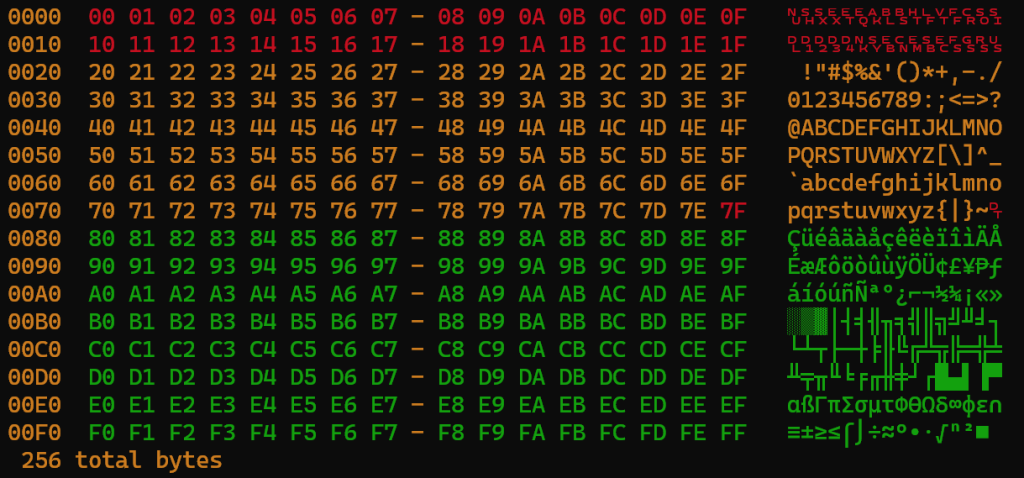
Figure 1. Output from my hexdump utility.
For contrast, below is output generated by using the traditional hexdump utility with the -C (canonical) switch active:
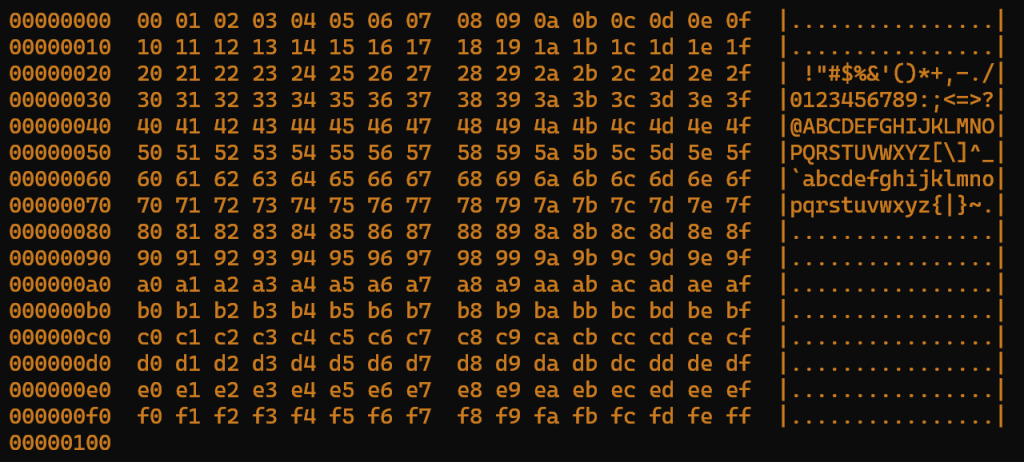
Figure 2. Output from the traditional hexdump utility.
As you can see by comparing the two figures, my program doesn’t exactly match the text output from the traditional hexdump utility, which is okay. But I like having characters in the far right column as opposed to dots. Further, I find it helpful to have the colors match the hex bytes as well as their corresponding characters. Some users may feel that this presentation is too busy, but I’m a fan.
This is a very useful utility which goes way beyond just a C tutorial.
What would happen if you threw a UTF8 file at it that contained 16 and 32 bit Unicode characters? I assume it would interpret them as 2 or 4 ASCII / Extended ASCII characters.
Yes, I can confirm that when run on a wide-character string the color hexdump utility reads things as single bytes, not wide characters. It looks pretty, but it’s not wide. 🙂